Build complete app with zero backend
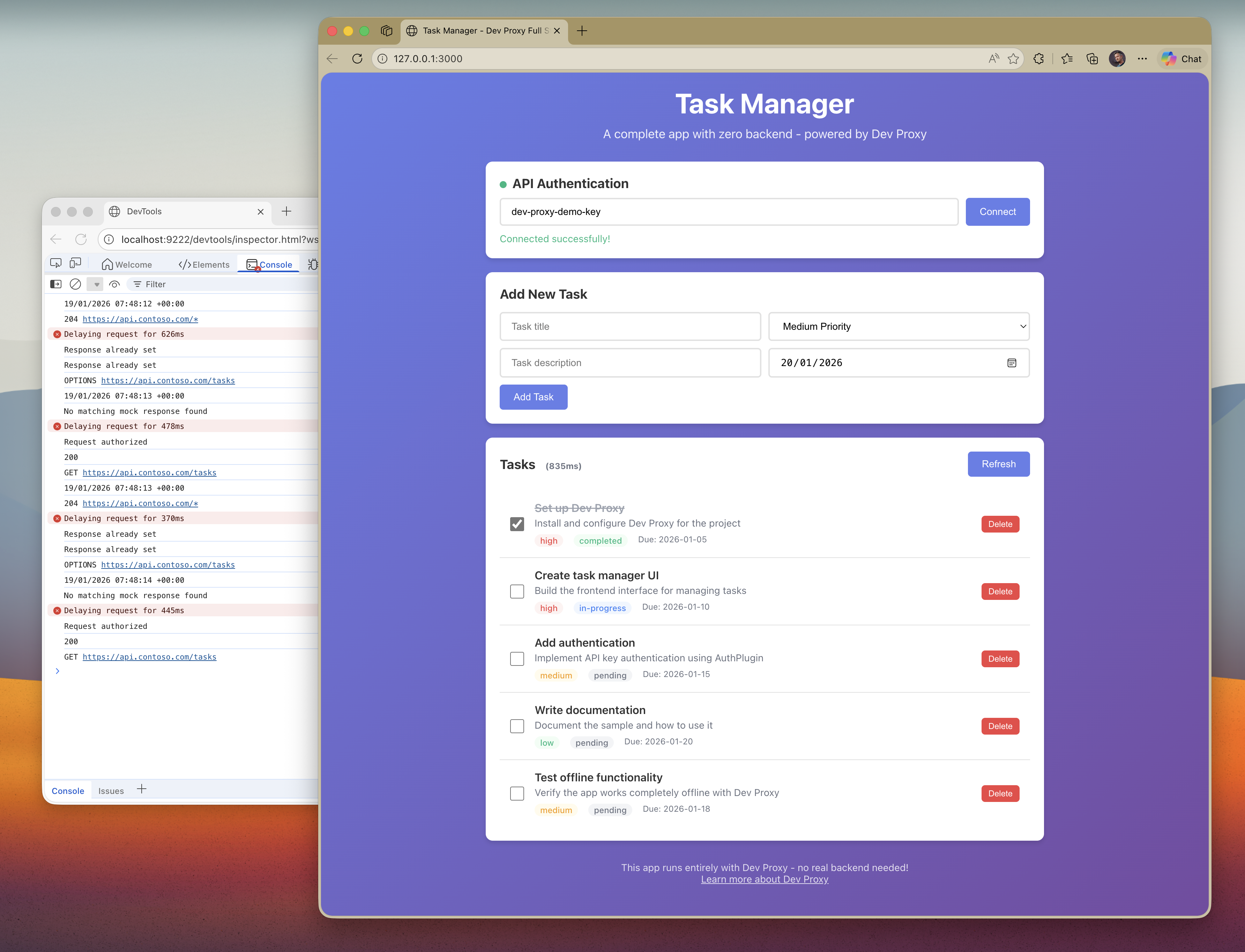
Demonstrates building a complete task manager application with zero backend using Dev Proxy. Features a vanilla JavaScript frontend with full CRUD operations, API key authentication, realistic latency simulation, and Chrome DevTools integration.

Build complete app with zero backend
Summary
This sample demonstrates how to build a complete task manager application with zero backend using Dev Proxy. It showcases Dev Proxy’s full value proposition by combining multiple plugins to create a realistic development environment that runs entirely offline.
The sample includes:
- CrudApiPlugin - Full CRUD API with in-memory data store for tasks
- AuthPlugin - API key authentication to secure the API
- LatencyPlugin - Realistic response time simulation (200-800ms)
- DevToolsPlugin - Chrome DevTools integration for debugging
Compatibility
Contributors
Version history
| Version | Date | Comments |
|---|---|---|
| 1.0.0 | January 19, 2026 | Initial release |
Prerequisites
- Dev Proxy
- Node.js LTS (for http-server)
Minimal path to awesome
- Get the sample:
-
Download just this sample:
npx gitload-cli https://github.com/pnp/proxy-samples/tree/main/samples/full-stack-no-backendor
-
Download as a .ZIP file and unzip it, or
-
Clone this repository
-
- Navigate to the sample folder:
cd samples/full-stack-no-backend - Run
npm installto install dependencies - Run
npm startto start Dev Proxy and the web server - Open http://localhost:3000 in your browser
- The app auto-connects using the default API key (
dev-proxy-demo-key)
Architecture
┌─────────────────┐     ┌─────────────────────────────────────┐
│                 │     │            Dev Proxy                │
│   Frontend      │     │  ┌─────────────────────────────┐   │
│   (Browser)     │────▶│  │      LatencyPlugin          │   │
│                 │     │  │   (200-800ms delay)         │   │
│   index.html    │     │  └─────────────┬───────────────┘   │
│                 │     │                │                    │
└─────────────────┘     │  ┌─────────────▼───────────────┐   │
                        │  │       AuthPlugin            │   │
                        │  │  (API key validation)       │   │
                        │  └─────────────┬───────────────┘   │
                        │                │                    │
                        │  ┌─────────────▼───────────────┐   │
                        │  │      CrudApiPlugin          │   │
                        │  │   (in-memory data store)    │   │
                        │  └─────────────┬───────────────┘   │
                        │                │                    │
                        │  ┌─────────────▼───────────────┐   │
                        │  │     DevToolsPlugin          │   │
                        │  │   (Chrome DevTools)         │   │
                        │  └─────────────────────────────┘   │
                        └─────────────────────────────────────┘
Features
This sample illustrates the following concepts:
Complete CRUD API
- GET /tasks - Retrieve all tasks
- GET /tasks/{id} - Retrieve a single task
- POST /tasks - Create a new task
- PATCH /tasks/{id} - Update a task
- DELETE /tasks/{id} - Delete a task
API Key Authentication
- Requests must include
x-api-key: dev-proxy-demo-keyheader - Invalid keys return 401 Unauthorized
Realistic Latency
- All responses are delayed by 200-800ms
- Simulates real-world network conditions
- Latency is displayed in the UI
DevTools Integration
- Opens Chrome DevTools automatically
- View all intercepted requests and responses
- Debug API calls in real-time
Vanilla JavaScript Frontend
- No framework dependencies
- Full task management UI
- Real-time status updates
- Responsive design
Why this approach?
- Ship MVPs without backend team - Start building your frontend immediately
- Complete offline development - No internet required, works anywhere
- Realistic testing - Latency and authentication behave like production
- Easy debugging - DevTools integration shows exactly what’s happening
- Single tool solution - Everything runs through Dev Proxy
Help
We do not support samples, but this community is always willing to help, and we want to improve these samples. We use GitHub to track issues, which makes it easy for community members to volunteer their time and help resolve issues.
You can try looking at issues related to this sample to see if anybody else is having the same issues.
If you encounter any issues using this sample, create a new issue.
Finally, if you have an idea for improvement, make a suggestion.
Disclaimer
THIS CODE IS PROVIDED AS IS WITHOUT WARRANTY OF ANY KIND, EITHER EXPRESS OR IMPLIED, INCLUDING ANY IMPLIED WARRANTIES OF FITNESS FOR A PARTICULAR PURPOSE, MERCHANTABILITY, OR NON-INFRINGEMENT.