Simulate Azure OpenAI to GitHub Models failover
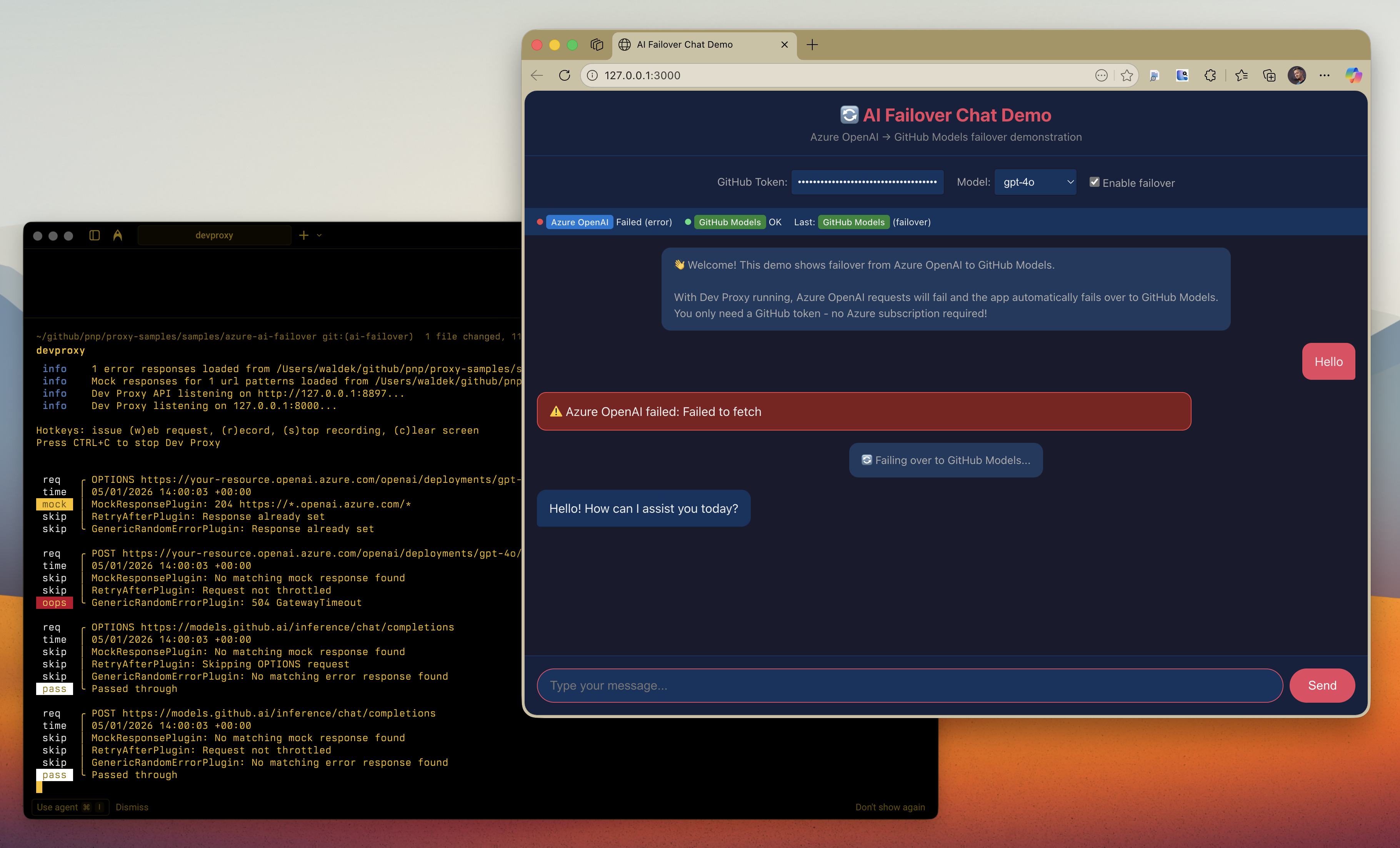
This sample demonstrates how to test failover logic from Azure OpenAI to GitHub Models using Dev Proxy. The sample includes a chat app that attempts to use Azure OpenAI as the primary provider and automatically fails over to GitHub Models when Azure OpenAI is unavailable. Key benefit: You don't need an actual Azure OpenAI deployment to test failover! Dev Proxy simulates Azure OpenAI failures, and the app falls back to GitHub Models using just your GitHub token.

Simulate Azure OpenAI to GitHub Models failover
Summary
This sample demonstrates how to test failover logic from Azure OpenAI to GitHub Models using Dev Proxy. The sample includes a chat app that attempts to use Azure OpenAI as the primary provider and automatically fails over to GitHub Models when Azure OpenAI is unavailable.
Key benefit: You don’t need an actual Azure OpenAI deployment to test failover! Dev Proxy simulates Azure OpenAI failures, and the app falls back to GitHub Models using just your GitHub token.
The sample configures Dev Proxy to fail all requests to Azure OpenAI with various error responses (503, 500, 429, 504), demonstrating how your application should handle service disruptions and automatically route traffic to a backup provider.
Compatibility
Contributors
Version history
| Version | Date | Comments |
|---|---|---|
| 1.3 | February 4, 2026 | Updated to Dev Proxy v2.1.0 |
| 1.2 | January 18, 2026 | Moved config files to .devproxy folder |
| 1.1 | January 5, 2026 | Updated to Dev Proxy v2.0.0 |
| 1.0 | January 5, 2026 | Initial release |
Minimal path to awesome
Prerequisites
-
Get a GitHub Token (for GitHub Models API):
The easiest way is to use this pre-filled link that creates a token with the correct permissions:
Or create one manually:
- Go to GitHub Settings → Developer settings → Personal access tokens → Fine-grained tokens
- Click Generate new token
- Give it a name (e.g., “GitHub Models token”)
- Set an expiration
- Under Permissions → Account permissions, find Models and set it to Read
- Click Generate token and copy the token
Note: The token needs the
models:readpermission to access GitHub Models. -
Install Dev Proxy if you haven’t already:
Run the Demo
- Get the sample:
-
Download just this sample:
npx gitload-cli https://github.com/pnp/proxy-samples/tree/main/samples/azure-ai-failoveror
-
Download as a .ZIP file and unzip it, or
-
Clone this repository
-
- Start Dev Proxy:
devproxy - In a new terminal, start the web server:
npx http-server -p 3000 - Open http://localhost:3000 in your browser
- Enter your GitHub token and start chatting
- Watch Dev Proxy fail Azure OpenAI requests and the app automatically failover to GitHub Models
Features
This preset simulates various Azure OpenAI failure scenarios:
- 503 Service Unavailable - Server temporarily unable to handle requests
- 500 Internal Server Error - Service encountered an internal error
- 429 Too Many Requests - Rate limit exceeded with dynamic Retry-After header
- 504 Gateway Timeout - Gateway did not receive a response in time
Using this sample you can:
- Test that your application correctly detects Azure OpenAI failures
- Validate automatic failover to GitHub Models as a backup provider
- Ensure proper error handling and user feedback during outages
- Verify retry logic with Retry-After headers
- Test circuit breaker patterns in your application
Demo chat app
The included index.html is a minimal client-side chat application that:
- Attempts to call Azure OpenAI first (intercepted by Dev Proxy)
- Automatically fails over to GitHub Models when Azure OpenAI fails
- Shows real-time status of both providers
- Displays which provider responded to each message
- Requires only a GitHub token - no Azure subscription needed!
Adjusting failure rate
By default, the sample fails 100% of requests to Azure OpenAI. To simulate intermittent failures:
- Open
devproxyrc.json - Change the
ratevalue in theazureOpenAIFailoversection (0-100)
Help
We do not support samples, but this community is always willing to help, and we want to improve these samples. We use GitHub to track issues, which makes it easy for community members to volunteer their time and help resolve issues.
You can try looking at issues related to this sample to see if anybody else is having the same issues.
If you encounter any issues using this sample, create a new issue.
Finally, if you have an idea for improvement, make a suggestion.
Disclaimer
THIS CODE IS PROVIDED AS IS WITHOUT WARRANTY OF ANY KIND, EITHER EXPRESS OR IMPLIED, INCLUDING ANY IMPLIED WARRANTIES OF FITNESS FOR A PARTICULAR PURPOSE, MERCHANTABILITY, OR NON-INFRINGEMENT.