Simulating API key authentication
Demonstrates how to simulate API key authentication for mock APIs using Dev Proxy with AuthPlugin and MockResponsePlugin.

Simulating API key authentication
Summary
This sample demonstrates how to simulate API key authentication for mock APIs using Dev Proxy. The AuthPlugin validates API keys in header, query parameter, or cookie, while the MockResponsePlugin provides the API responses. This is useful for testing API key authentication flows without a real backend, such as Azure Functions, API Gateway integrations, and other services that use API keys for authentication.
Compatibility
Contributors
Version history
| Version | Date | Comments |
|---|---|---|
| 1.1 | February 4, 2026 | Updated to Dev Proxy v2.1.0 |
| 1.0 | January 18, 2026 | Initial release |
Minimal path to awesome
- Get the sample:
-
Download just this sample:
npx gitload-cli https://github.com/pnp/proxy-samples/tree/main/samples/api-key-protected-mockor
-
Download as a .ZIP file and unzip it, or
-
Clone this repository
-
- Start Dev Proxy:
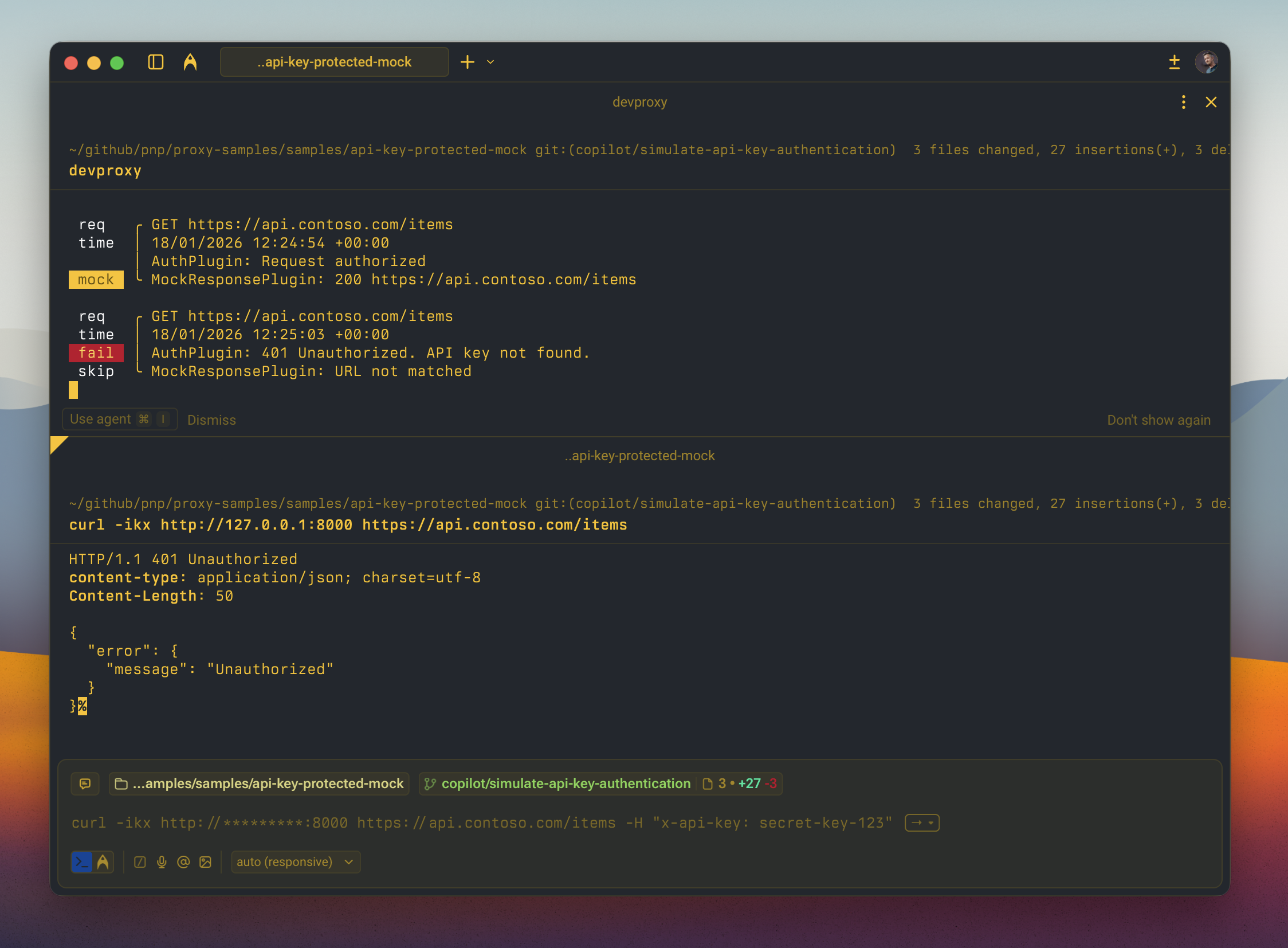
devproxy - Test the API key authentication by making requests:
With valid API key in header (should return 200):
curl -ikx http://127.0.0.1:8000 https://api.contoso.com/items -H "x-api-key: secret-key-123"With valid API key in query parameter (should return 200):
curl -ikx http://127.0.0.1:8000 "https://api.contoso.com/items?code=dev-key-456"With valid API key in cookie (should return 200):
curl -ikx http://127.0.0.1:8000 https://api.contoso.com/items -H "Cookie: api_key=secret-key-123"Without API key (should return 401 Unauthorized):
curl -ikx http://127.0.0.1:8000 https://api.contoso.com/itemsWith invalid API key (should return 401 Unauthorized):
curl -ikx http://127.0.0.1:8000 https://api.contoso.com/items -H "x-api-key: invalid-key"Features
This sample configures API key authentication that accepts keys in multiple locations:
Supported API Key Locations:
header- Pass the API key in thex-api-keyheaderquery- Pass the API key as thecodequery parametercookie- Pass the API key in theapi_keycookie
Allowed API Keys:
secret-key-123- Primary API key for testingdev-key-456- Secondary API key for development
Mock API Endpoints:
GET /items- List all itemsGET /items/{id}- Get a specific itemPOST /items- Create a new itemPUT /items/{id}- Update an itemDELETE /items/{id}- Delete an item
Using this sample you can use Dev Proxy to:
- Test API key authentication flows without a real backend
- Simulate Azure Functions or API Gateway authentication
- Validate client applications properly include API keys in requests
- Verify applications handle 401 Unauthorized responses correctly
- Test different API key transmission methods (header, query, cookie)
Configuration
The sample uses the following configuration to enable API key authentication:
{
  "auth": {
    "type": "apiKey",
    "apiKey": {
      "parameters": [
        { "in": "header", "name": "x-api-key" },
        { "in": "query", "name": "code" },
        { "in": "cookie", "name": "api_key" }
      ],
      "allowedKeys": ["secret-key-123", "dev-key-456"]
    }
  }
}
You can customize the configuration by:
- Adding or removing parameter locations (header, query, cookie)
- Changing parameter names to match your API’s requirements
- Adding or removing allowed API keys
Help
We do not support samples, but this community is always willing to help, and we want to improve these samples. We use GitHub to track issues, which makes it easy for community members to volunteer their time and help resolve issues.
You can try looking at issues related to this sample to see if anybody else is having the same issues.
If you encounter any issues using this sample, create a new issue.
Finally, if you have an idea for improvement, make a suggestion.
Disclaimer
THIS CODE IS PROVIDED AS IS WITHOUT WARRANTY OF ANY KIND, EITHER EXPRESS OR IMPLIED, INCLUDING ANY IMPLIED WARRANTIES OF FITNESS FOR A PARTICULAR PURPOSE, MERCHANTABILITY, OR NON-INFRINGEMENT.