Simulate API degradation scenarios
This sample demonstrates how to simulate various API degradation scenarios including intermittent errors, rate limiting, and slow responses to test your application's resilience.

Simulate API degradation scenarios
Summary
This sample demonstrates how to simulate various API degradation scenarios to test how your application handles partial failures, intermittent errors, rate limiting, and slow responses. Use these configurations to build apps that gracefully degrade under stress and verify that your error handling and retry logic works before production.
Compatibility
Contributors
Version history
| Version | Date | Comments |
|---|---|---|
| 1.1 | February 4, 2026 | Updated to Dev Proxy v2.1.0 |
| 1.0 | January 18, 2026 | Initial release |
Prerequisites
Minimal path to awesome
- Get the sample:
-
Download just this sample:
npx gitload-cli https://github.com/pnp/proxy-samples/tree/main/samples/api-degradation-scenariosor
-
Download as a .ZIP file and unzip it, or
-
Clone this repository
-
- Start the sample app and Dev Proxy by running
npm start - In a web browser, navigate to
http://localhost:3000and use the dashboard to test API degradation scenarios
Using the monitoring dashboard
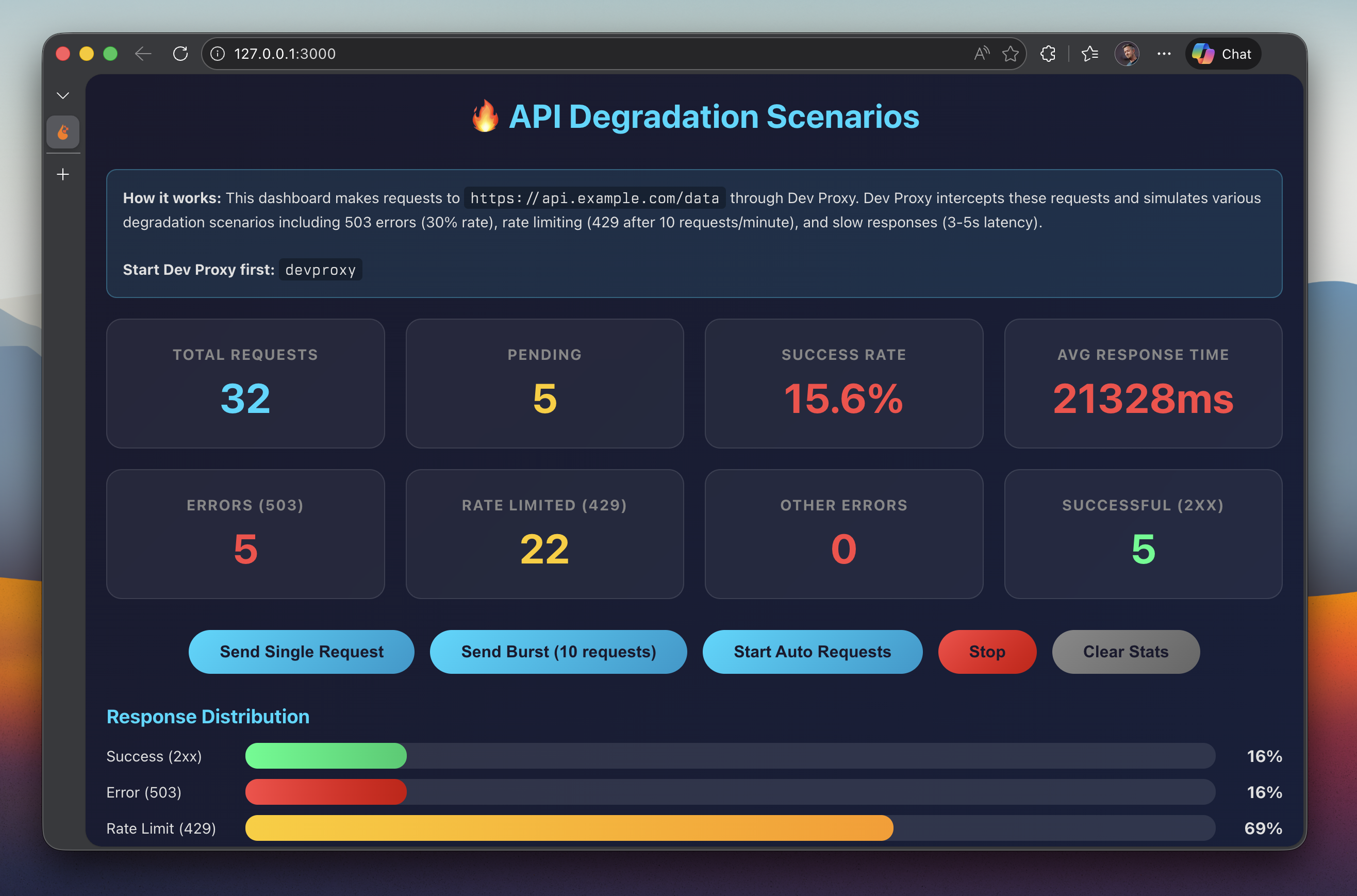
The included web app provides a real-time monitoring dashboard that shows:
- Total Requests - Number of requests made
- Success Rate - Percentage of successful requests
- Average Response Time - Average response time across all requests
- Error counts - Breakdown of 503 and 429 errors
- Response Distribution - Visual bar chart of response types
Use the dashboard buttons to:
- Send Single Request - Make one API request
- Send Burst (10 requests) - Make 10 concurrent requests to trigger rate limiting
- Start Auto Requests - Continuously send requests every second
- Stop - Stop auto requests
- Clear Stats - Reset all statistics
Using Dev Proxy configurations directly
You can also run Dev Proxy with specific configurations:
All degradation scenarios combined
This configuration combines all three degradation scenarios: intermittent 503 errors (30% of requests), rate limiting (10 requests per minute), and slow responses (3-5 seconds latency).
devproxyIntermittent 503 errors only
This configuration simulates random 503 Service Unavailable errors for 30% of requests.
devproxy --config-file .devproxy/intermittent-errors.devproxyrc.jsonRate limiting only
This configuration simulates hitting rate limits with 429 Too Many Requests responses after 10 requests per minute.
devproxy --config-file .devproxy/rate-limiting.devproxyrc.jsonSlow responses only
This configuration adds random latency (3-5 seconds) to all responses.
devproxy --config-file .devproxy/slow-responses.devproxyrc.jsonFeatures
This sample demonstrates how to use Dev Proxy to simulate API degradation scenarios. Using this sample you can:
- Test your application’s handling of intermittent 503 Service Unavailable errors
- Verify retry logic and exponential backoff implementation
- Test rate limit handling and proper use of Retry-After headers
- Measure application performance under slow network conditions
- Validate graceful degradation patterns in your application
- Demonstrate that your error handling works before deploying to production
Configuration files
| File | Description |
|---|---|
.devproxy/devproxyrc.json | Combined configuration with all degradation scenarios |
.devproxy/intermittent-errors.devproxyrc.json | 503 errors at 30% failure rate |
.devproxy/rate-limiting.devproxyrc.json | Rate limiting at 10 requests/minute |
.devproxy/slow-responses.devproxyrc.json | Random latency between 3-5 seconds |
.devproxy/errors-503.json | Error responses for the GenericRandomErrorPlugin |
.devproxy/mocks.json | Mock responses for successful requests |
index.html | Monitoring dashboard web app |
package.json | Node.js configuration to run the sample |
Plugins used
- GenericRandomErrorPlugin - Simulates random errors at a configurable rate
- LatencyPlugin - Adds random delays to responses
- RateLimitingPlugin - Simulates API rate limiting behavior
- RetryAfterPlugin - Validates that clients respect Retry-After headers
Help
We do not support samples, but this community is always willing to help, and we want to improve these samples. We use GitHub to track issues, which makes it easy for community members to volunteer their time and help resolve issues.
You can try looking at issues related to this sample to see if anybody else is having the same issues.
If you encounter any issues using this sample, create a new issue.
Finally, if you have an idea for improvement, make a suggestion.
Disclaimer
THIS CODE IS PROVIDED AS IS WITHOUT WARRANTY OF ANY KIND, EITHER EXPRESS OR IMPLIED, INCLUDING ANY IMPLIED WARRANTIES OF FITNESS FOR A PARTICULAR PURPOSE, MERCHANTABILITY, OR NON-INFRINGEMENT.