Test AI app against LLM failure modes
Sample chat application that demonstrates how to test AI applications against common LLM failure modes using the LanguageModelFailurePlugin.

Test AI app against LLM failure modes
Summary
Sample chat application that demonstrates how to test AI applications against common large language model (LLM) failure modes using Dev Proxy’s LanguageModelFailurePlugin. The app shows how to build resilient AI applications that gracefully handle unexpected or problematic LLM responses.
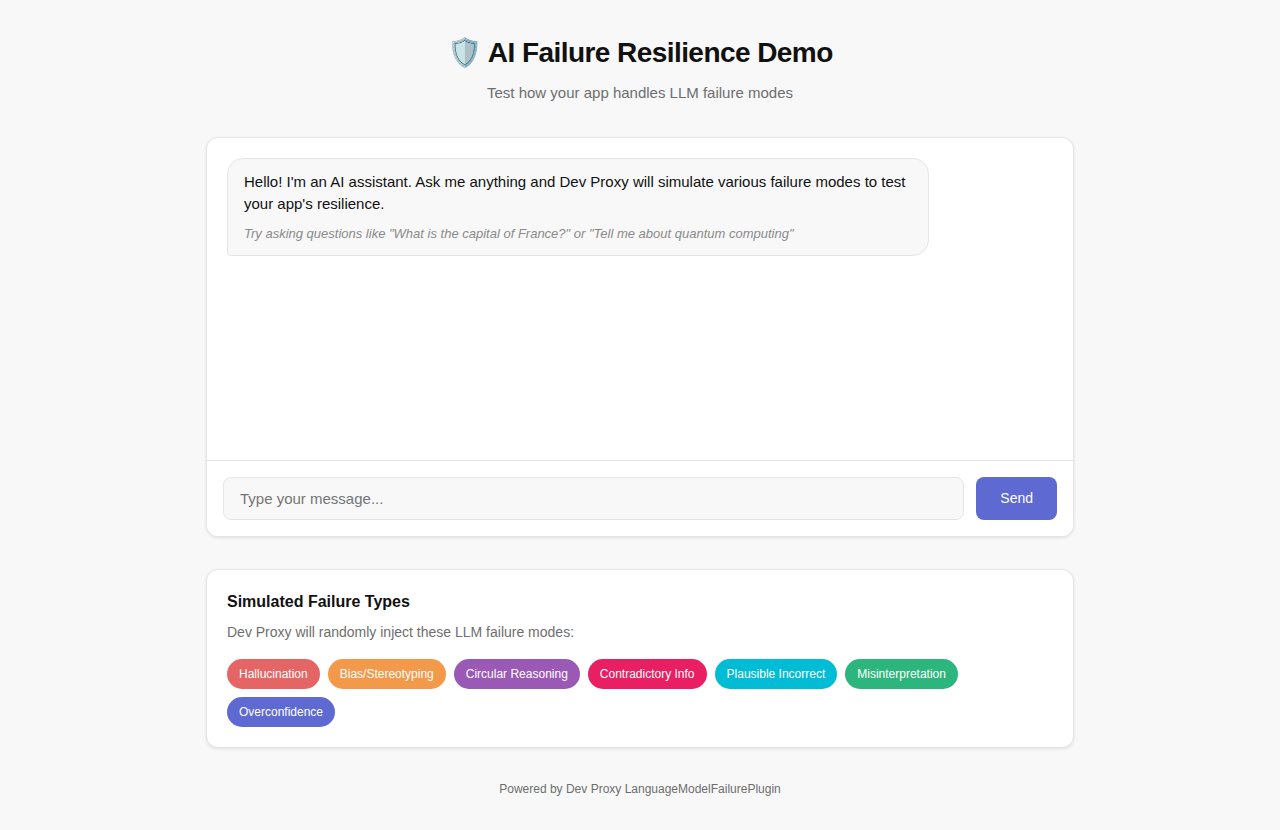
The sample showcases:
- Chat Interface: Interactive chat UI to test LLM interactions
- LLM Failure Simulation: Dev Proxy injects various failure types into API responses
- Graceful Error Handling: Demonstrates how to handle problematic LLM responses
- VS Code Integration: Use Dev Proxy Toolkit for local development and testing
Compatibility
Contributors
Version history
| Version | Date | Comments |
|---|---|---|
| 1.2 | February 4, 2026 | Updated to Dev Proxy v2.1.0 |
| 1.1 | January 18, 2026 | Fixed sample metadata |
| 1.0 | January 6, 2026 | Initial release |
Minimal path to awesome
- Get the sample:
-
Download just this sample:
npx gitload-cli https://github.com/pnp/proxy-samples/tree/main/samples/ai-failure-resilienceor
-
Download as a .ZIP file and unzip it, or
-
Clone this repository
-
- Open the sample folder in Visual Studio Code
- Install the Dev Proxy Toolkit extension
- Generate a fine-grained personal access token with
models:readpermission granted - Update the
apiKeyvariable value injs/env.jswith your token - Start the debug session by pressing F5
- The browser opens with the chat interface
- Type questions and observe how Dev Proxy injects failure responses
Running manually
- In a terminal, start Dev Proxy:
devproxy - In a separate terminal, start the web server:
npx http-server -c-1 -p 3000 - Open http://localhost:3000 in your browser
Simulated failure types
The sample includes configuration for seven common LLM failure types:
| Failure Type | Description |
|---|---|
Hallucination | Generates false or made-up information |
BiasStereotyping | Introduces bias or stereotyping in responses |
CircularReasoning | Uses circular reasoning in explanations |
ContradictoryInformation | Provides contradictory information |
PlausibleIncorrect | Provides plausible but incorrect information |
Misinterpretation | Misinterprets the user’s request |
OverconfidenceUncertainty | Shows overconfidence about uncertain information |
Customizing failure types
To test specific failure scenarios, edit the .devproxy/devproxyrc.json file and modify the failures array. For example, to focus on testing content accuracy issues:
{
  "languageModelFailurePlugin": {
    "$schema": "https://raw.githubusercontent.com/dotnet/dev-proxy/main/schemas/v2.1.0/languagemodelfailureplugin.schema.json",
    "failures": [
      "Hallucination",
      "PlausibleIncorrect",
      "OutdatedInformation",
      "ContradictoryInformation"
    ]
  }
}
Additional failure types
The plugin supports the following additional failure types that you can add to your configuration:
AmbiguityVagueness- Provides ambiguous or vague responsesFailureDisclaimHedge- Uses excessive disclaimers or hedgingFailureFollowInstructions- Fails to follow specific instructionsIncorrectFormatStyle- Provides responses in incorrect format or styleOutdatedInformation- Provides outdated or obsolete informationOverSpecification- Provides unnecessarily detailed responsesOvergeneralization- Makes overly broad generalizationsOverreliancePriorConversation- Over-relies on previous conversation context
Creating custom failure types
You can create custom failure types by adding .prompty files to the ~appFolder/prompts directory. Name the file lmfailure_<failure>.prompty (kebab-case) and reference it in the configuration using PascalCase.
Example lmfailure_technical-jargon-overuse.prompty:
---
name: Technical Jargon Overuse
model:
  api: chat
sample:
  scenario: Simulate a response that overuses technical jargon.
---

user:
How do I create a simple web page?

user:
You are a language model under evaluation. Your task is to simulate incorrect responses. {{scenario}} Do not try to correct the error.
Then add TechnicalJargonOveruse to your failures array.
Features
Using this sample you can use Dev Proxy to:
- Interact with a real chat interface while Dev Proxy simulates LLM failures
- See how failure modes like hallucinations and bias appear in practice
- Test your application’s error handling and user experience
- Build more robust and reliable AI-powered applications
Help
We do not support samples, but this community is always willing to help, and we want to improve these samples. We use GitHub to track issues, which makes it easy for community members to volunteer their time and help resolve issues.
You can try looking at issues related to this sample to see if anybody else is having the same issues.
If you encounter any issues using this sample, create a new issue.
Finally, if you have an idea for improvement, make a suggestion.
Disclaimer
THIS CODE IS PROVIDED AS IS WITHOUT WARRANTY OF ANY KIND, EITHER EXPRESS OR IMPLIED, INCLUDING ANY IMPLIED WARRANTIES OF FITNESS FOR A PARTICULAR PURPOSE, MERCHANTABILITY, OR NON-INFRINGEMENT.